BIP39 Passphrase and Securing Your KeepKey from Physical Attacks
A BIP39 passphrase turns your single recovery phrase into infinitely many wallets. Used correctly, it's the strongest defense a hardware wallet can offer against physical theft and coercion. Used carelessly, it's the fastest way to lose access to your funds permanently.
This guide explains exactly what a passphrase is, why you'd want one, how it works in KeepKey Desktop, and the failure modes you need to plan around before you turn it on.
The threat model: physical attacks
Software wallets and exchange accounts are mostly threatened over the network. Hardware wallets shift that threat to your physical environment. The canonical example is the $5 wrench attack — an attacker doesn't break your encryption, they break your kneecap and ask you to unlock the device.
Against this threat model, a PIN is not enough. The attacker can stand over your shoulder and watch you enter it, or they can simply demand it. What you need is a way to truthfully unlock the device and reveal an empty (or near-empty) wallet while your real funds sit somewhere only you know about.
That is exactly what a BIP39 passphrase does.
How a BIP39 passphrase works
Your KeepKey holds a 12, 18, or 24-word recovery phrase. Without a passphrase, those words derive a single wallet — the "main" wallet. Every passphrase you type combines with the seed phrase to derive a completely different wallet with different addresses, balances, and keys:
- Empty passphrase (the default) → main wallet
groceries → wallet Bcold-storage-2026 → wallet Ccorrect horse battery staple → wallet D- Any random string → yet another wallet, almost certainly empty
There is no list of valid passphrases stored anywhere — not on the device, not in the desktop app, not in any cloud. The KeepKey has no way to tell which passphrase is "right." It just derives whatever wallet corresponds to whatever passphrase you typed.
That property is the security guarantee. It's also the danger.
Plausible deniability — the practical defense
Suppose you keep:
- A modest amount of crypto in your main wallet (no passphrase)
- The bulk of your funds in a passphrase wallet that only you know exists
When an attacker forces you to unlock the device, you unlock the main wallet. They see what's there, take it, and leave. Nothing on the device, nothing in the desktop app, and nothing in your transaction history reveals the existence of the second wallet. The blockchain only ever sees normal transactions originating from that hidden wallet — there is no metadata that says "and there's another wallet behind a passphrase."
For this to work, you must be disciplined about it: don't keep notes, don't talk about it, and do actually use the main wallet. A pristine, never-touched main wallet is a tell.
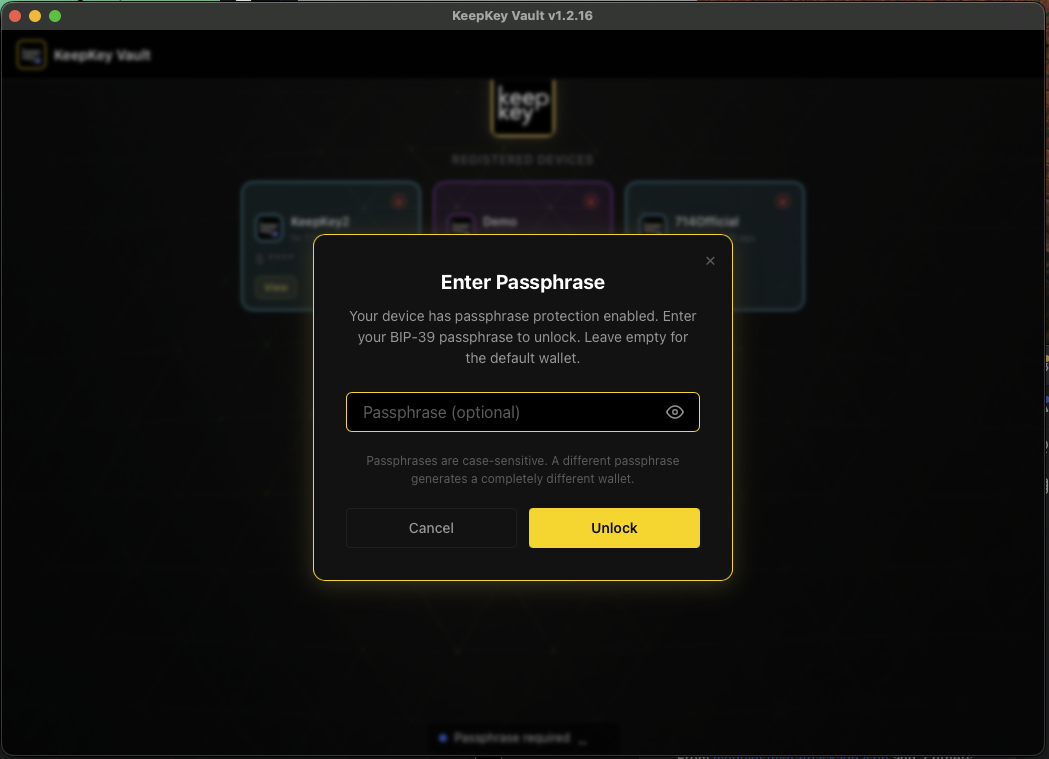
Enabling passphrase protection in KeepKey Desktop
In KeepKey Desktop, open Settings → Security and toggle Passphrase Protection on. From that point forward, every time you connect the KeepKey, you'll be prompted for the passphrase before you reach the portfolio.
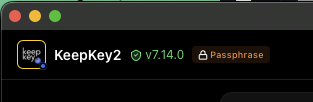
A leaving-an-empty-passphrase shortcut opens your main wallet. Typing any other string opens the corresponding hidden wallet — and the titlebar shows you which one is active:
The indicator is what keeps you sane: switching between main and hidden wallets is just a "disconnect, reconnect, type a different passphrase" cycle, and the titlebar prevents you from confusing them.
What the device knows (and doesn't)
This is the part most people get wrong. Read it twice:
- The KeepKey does not store your passphrase. Anywhere. Ever.
- Your recovery phrase backup does not include the passphrase.
- If you forget the passphrase, the recovery phrase alone cannot recover the hidden wallet.
The recovery phrase recovers the main wallet. The passphrase wallet requires the recovery phrase and the exact passphrase, byte-for-byte, capitalization and spaces and punctuation included. Lose either one and the funds are gone — not stolen, not "stuck," genuinely unrecoverable.
This is also why the device cannot tell you "wrong passphrase." From its point of view, every passphrase is correct — it just opens a different wallet. Type a typo and you'll see an empty wallet with addresses you've never used. The temptation in that moment is to assume you've been hacked. You haven't. You typed the wrong passphrase. Disconnect, reconnect, try again.
Failure modes to plan for
1. Forgetting the passphrase
The classic failure. You set up a hidden wallet, fund it, walk away for six months, come back and can't remember whether you used Cold-Storage-2026 or cold_storage_2026 or coldstorage2026. Each of those is a separate wallet. None of them shows you a helpful error.
Defense: Treat the passphrase like a second half of the recovery phrase. Write it down on paper, store it somewhere secure, and test that you can reproduce it before you send significant funds in. Send a small test transaction. Disconnect the device. Reconnect, re-enter the passphrase, confirm the small test arrives. Then fund it for real.
2. Typos that don't fail loudly
my-savings and my-Savings and mysavings are three different wallets. If your daily passphrase has any non-trivial structure (capitalization, special characters, spaces) you will eventually mistype it.
Defense: Pick a passphrase you can type cleanly. Random-looking high-entropy passphrases are great for security but terrible for muscle memory. A phrase that's meaningful to you and reproducible exactly is better than 30 characters of base64.
3. Storing seed and passphrase together
The whole security model collapses if both pieces are in the same drawer. An attacker who breaks into your safe and finds both is exactly as dangerous as one who finds an unprotected seed.
Defense: Store them separately. Different physical locations, different containers, ideally different access controls. The point is that compromising one of them tells the attacker nothing about the other.
Should you turn this on?
For most users, no. A KeepKey with a strong PIN, the recovery phrase written down on paper and stored well, and the discipline to keep it offline is already a tier above what most people in crypto bother with. Adding a passphrase doubles the failure surface — every place you previously needed to remember/protect "the seed" now needs "the seed AND the passphrase."
Turn it on if any of these are true and you have understood the failure modes:
- You hold an amount where physical coercion is a realistic threat
- You want hard compartmentalization between daily-use and long-term funds
- You operate in jurisdictions where authorities may demand a wallet unlock at a border crossing or in court
If none of those apply, leave the passphrase off and put the saved cognitive overhead into making your seed-phrase storage genuinely good.
Related